
NVidia Driver not installed???????????
-
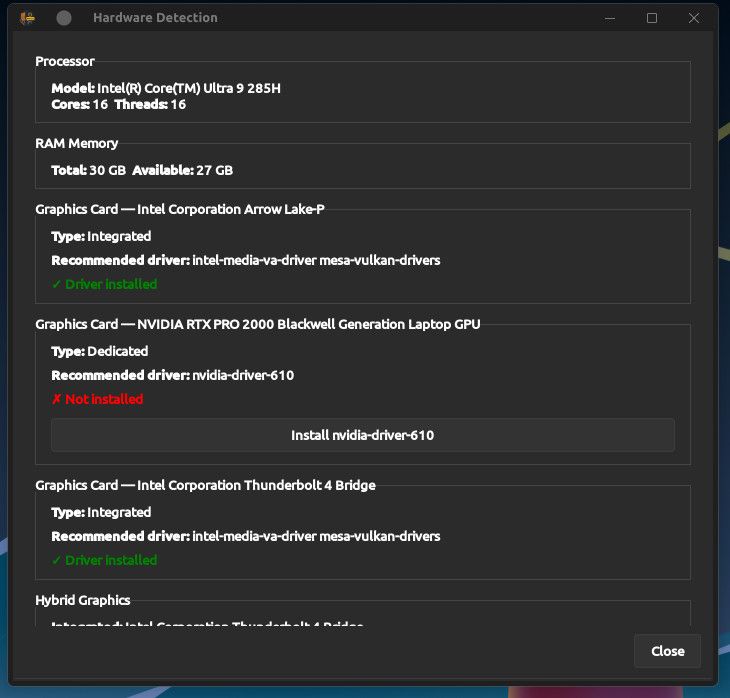
Using tyson, all up to date using kernel 7.3, for some odd reason welcome app shows NVidia drivers are not installed, and repeated attempts show the same thing. Yes I have rebooted but no difference. Providing screenshot:
-
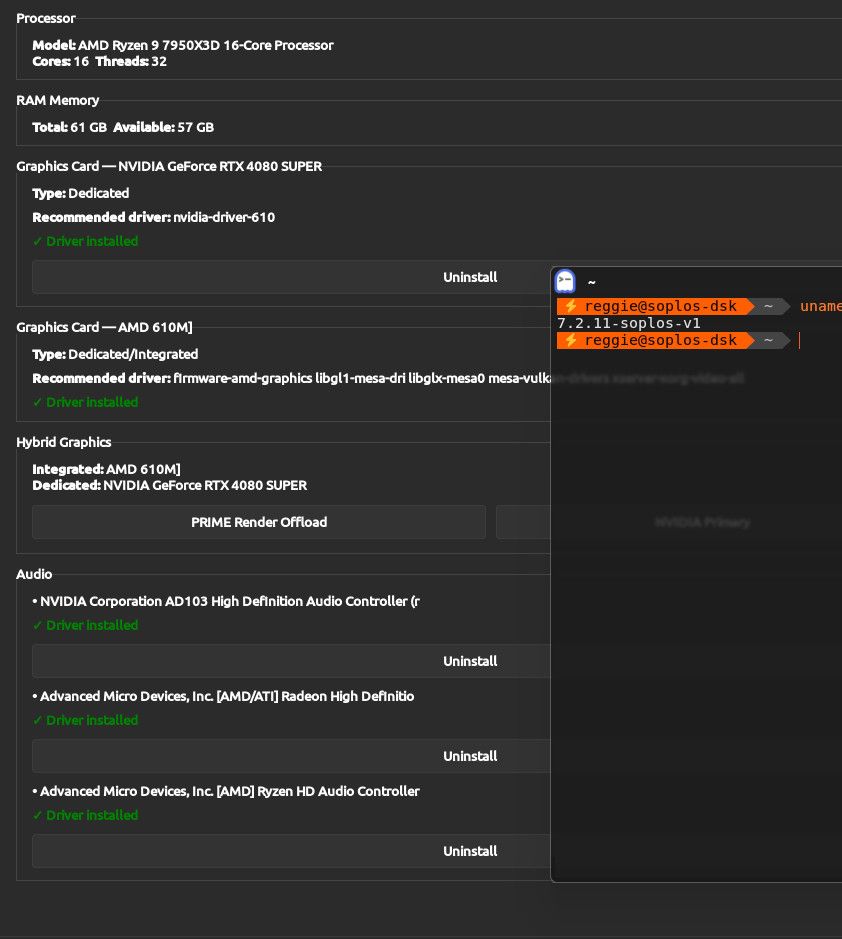
FYI this is just an issue with kernel 7.3. When I use kernel 7.2.x Nvidia driver loads just fine.
-
Hi masterpier,
Thanks for letting us know and for confirming it only happened with kernel 7.3. It's now fixed in Soplos Welcome 2.1.4 (October 22) and later. Please update the system and check the version:
sudo apt update
sudo apt full-upgrade
apt policy soplos-welcome
Then open Welcome and press "Install nvidia-driver-610" with kernel 7.3. Let us know whether it now shows as installed; if it fails, please paste the error here.
Best regards
-
here is the output from the commands you provided:
sudo apt full-upgrade
The following packages were automatically installed and are no longer required:
libixml11t64 libupnp17t64
Use 'sudo apt autoremove' to remove them.Summary:
Upgrading: 0, Installing: 0, Removing: 0, Not Upgrading: 0
3 not fully installed or removed.
Space needed: 0 B / 571 GB availableContinue? [Y/n]
Setting up nvidia-kernel-open-dkms (610.57.04-1)…
Removing old nvidia/610.57.04 DKMS files...
Module nvidia/610.57.04 for kernel 7.2.9-soplos-v1 (x86_64):
Before uninstall, this module version was ACTIVE on this kernel.
Deleting /lib/modules/7.2.9-soplos-v1/updates/dkms/nvidia.ko.xz
Deleting /lib/modules/7.2.9-soplos-v1/updates/dkms/nvidia-modeset.ko.xz
Deleting /lib/modules/7.2.9-soplos-v1/updates/dkms/nvidia-drm.ko.xz
Deleting /lib/modules/7.2.9-soplos-v1/updates/dkms/nvidia-peermem.ko.xz
Deleting /lib/modules/7.2.9-soplos-v1/updates/dkms/nvidia-uvm.ko.xz
Running depmod.... done.Module nvidia/610.57.04 for kernel 7.2.10-soplos-v1 (x86_64):
Before uninstall, this module version was ACTIVE on this kernel.
Deleting /lib/modules/7.2.10-soplos-v1/updates/dkms/nvidia.ko.xz
Deleting /lib/modules/7.2.10-soplos-v1/updates/dkms/nvidia-modeset.ko.xz
Deleting /lib/modules/7.2.10-soplos-v1/updates/dkms/nvidia-drm.ko.xz
Deleting /lib/modules/7.2.10-soplos-v1/updates/dkms/nvidia-peermem.ko.xz
Deleting /lib/modules/7.2.10-soplos-v1/updates/dkms/nvidia-uvm.ko.xz
Running depmod.... done.Module nvidia/610.57.04 for kernel 7.2.11-soplos-v1 (x86_64):
Before uninstall, this module version was ACTIVE on this kernel.
Deleting /lib/modules/7.2.11-soplos-v1/updates/dkms/nvidia.ko.xz
Deleting /lib/modules/7.2.11-soplos-v1/updates/dkms/nvidia-modeset.ko.xz
Deleting /lib/modules/7.2.11-soplos-v1/updates/dkms/nvidia-drm.ko.xz
Deleting /lib/modules/7.2.11-soplos-v1/updates/dkms/nvidia-peermem.ko.xz
Deleting /lib/modules/7.2.11-soplos-v1/updates/dkms/nvidia-uvm.ko.xz
Running depmod.... done.Deleting module nvidia/610.57.04 completely from the DKMS tree.
Loading new nvidia/610.57.04 DKMS files...
Building for 7.2.8-soplos-v1, 7.2.9-soplos-v1, 7.2.10-soplos-v1, 7.2.11-soplos-v1 and 7.3.0-soplos-v1Module build for kernel 7.2.8-soplos-v1 was skipped since the
kernel headers for this kernel do not seem to be installed.Building initial module nvidia/610.57.04 for 7.2.9-soplos-v1
Sign command: /lib/modules/7.2.9-soplos-v1/build/scripts/sign-file
Signing key: /var/lib/dkms/mok.key
Public certificate (MOK): /var/lib/dkms/mok.pubBuilding module(s).......................... done.
Signing module /var/lib/dkms/nvidia/610.57.04/build/kernel-open/nvidia.ko
Signing module /var/lib/dkms/nvidia/610.57.04/build/kernel-open/nvidia-modeset.ko
Signing module /var/lib/dkms/nvidia/610.57.04/build/kernel-open/nvidia-drm.ko
Signing module /var/lib/dkms/nvidia/610.57.04/build/kernel-open/nvidia-peermem.ko
Signing module /var/lib/dkms/nvidia/610.57.04/build/kernel-open/nvidia-uvm.ko
Installing /lib/modules/7.2.9-soplos-v1/updates/dkms/nvidia.ko.xz
Installing /lib/modules/7.2.9-soplos-v1/updates/dkms/nvidia-modeset.ko.xz
Installing /lib/modules/7.2.9-soplos-v1/updates/dkms/nvidia-drm.ko.xz
Installing /lib/modules/7.2.9-soplos-v1/updates/dkms/nvidia-peermem.ko.xz
Installing /lib/modules/7.2.9-soplos-v1/updates/dkms/nvidia-uvm.ko.xz
Running depmod.... done.Building initial module nvidia/610.57.04 for 7.2.10-soplos-v1
Sign command: /lib/modules/7.2.10-soplos-v1/build/scripts/sign-file
Signing key: /var/lib/dkms/mok.key
Public certificate (MOK): /var/lib/dkms/mok.pubBuilding module(s)......................... done.
Signing module /var/lib/dkms/nvidia/610.57.04/build/kernel-open/nvidia.ko
Signing module /var/lib/dkms/nvidia/610.57.04/build/kernel-open/nvidia-modeset.ko
Signing module /var/lib/dkms/nvidia/610.57.04/build/kernel-open/nvidia-drm.ko
Signing module /var/lib/dkms/nvidia/610.57.04/build/kernel-open/nvidia-peermem.ko
Signing module /var/lib/dkms/nvidia/610.57.04/build/kernel-open/nvidia-uvm.ko
Installing /lib/modules/7.2.10-soplos-v1/updates/dkms/nvidia.ko.xz
Installing /lib/modules/7.2.10-soplos-v1/updates/dkms/nvidia-modeset.ko.xz
Installing /lib/modules/7.2.10-soplos-v1/updates/dkms/nvidia-drm.ko.xz
Installing /lib/modules/7.2.10-soplos-v1/updates/dkms/nvidia-peermem.ko.xz
Installing /lib/modules/7.2.10-soplos-v1/updates/dkms/nvidia-uvm.ko.xz
Running depmod.... done.Building initial module nvidia/610.57.04 for 7.2.11-soplos-v1
Sign command: /lib/modules/7.2.11-soplos-v1/build/scripts/sign-file
Signing key: /var/lib/dkms/mok.key
Public certificate (MOK): /var/lib/dkms/mok.pubBuilding module(s)......................... done.
Signing module /var/lib/dkms/nvidia/610.57.04/build/kernel-open/nvidia.ko
Signing module /var/lib/dkms/nvidia/610.57.04/build/kernel-open/nvidia-modeset.ko
Signing module /var/lib/dkms/nvidia/610.57.04/build/kernel-open/nvidia-drm.ko
Signing module /var/lib/dkms/nvidia/610.57.04/build/kernel-open/nvidia-peermem.ko
Signing module /var/lib/dkms/nvidia/610.57.04/build/kernel-open/nvidia-uvm.ko
Installing /lib/modules/7.2.11-soplos-v1/updates/dkms/nvidia.ko.xz
Installing /lib/modules/7.2.11-soplos-v1/updates/dkms/nvidia-modeset.ko.xz
Installing /lib/modules/7.2.11-soplos-v1/updates/dkms/nvidia-drm.ko.xz
Installing /lib/modules/7.2.11-soplos-v1/updates/dkms/nvidia-peermem.ko.xz
Installing /lib/modules/7.2.11-soplos-v1/updates/dkms/nvidia-uvm.ko.xz
Running depmod.... done.Building initial module nvidia/610.57.04 for 7.3.0-soplos-v1
Sign command: /lib/modules/7.3.0-soplos-v1/build/scripts/sign-file
Signing key: /var/lib/dkms/mok.key
Public certificate (MOK): /var/lib/dkms/mok.pubBuilding module(s)......................(bad exit status: 2)
Failed command:
'make' -j16 KERNEL_UNAME=7.3.0-soplos-v1 IGNORE_PREEMPT_RT_PRESENCE=1 IGNORE_XEN_PRESENCE=1 modulesError! Bad return status for module build on kernel: 7.3.0-soplos-v1 (x86_64)
Consult /var/lib/dkms/nvidia/610.57.04/build/make.log for more information.
Builds for the following kernel(s) failed: 7.3.0-soplos-v1
dpkg: error processing package nvidia-kernel-open-dkms (--configure):
old nvidia-kernel-open-dkms package postinst maintainer script subprocess failed with exit status 10
dpkg: dependency problems prevent configuration of nvidia-driver:
nvidia-driver depends on nvidia-kernel-dkms (= 610.57.04-1) | nvidia-kernel-open-dkms (= 610.57.04-1); however:
Package nvidia-kernel-dkms is not installed.
Package nvidia-kernel-open-dkms is not configured yet.dpkg: error processing package nvidia-driver (--configure):
dependency problems - leaving unconfigured
dpkg: dependency problems prevent configuration of nvidia-open:
nvidia-open depends on nvidia-kernel-open-dkms (>= 610.57.04); however:
Package nvidia-kernel-open-dkms is not configured yet.
nvidia-open depends on nvidia-driver (>= 610.57.04); however:
Package nvidia-driver is not configured yet.dpkg: error processing package nvidia-open (--configure):
dependency problems - leaving unconfigured
Errors were encountered while processing:
nvidia-kernel-open-dkms
nvidia-driver
nvidia-open
Error: Sub-process /usr/bin/dpkg returned an error code (1)
reggie@soplos-tyson ~ -
Hi masterpier,
Thanks for sharing the log. The issue is clear:
apt full-upgradetried to build the NVIDIA module for your newest kernel (7.3.0-soplos-v1) and failed because the compatibility patches were missing. This left the packages half-configured and blocked APT.The clean way to fix this using our tools is as follows. The order matters:
1. Boot into a previous kernel
Reboot and select
7.2.11-soplos-v1from GRUB, where the NVIDIA module works correctly.2. Remove the 7.3.0 kernel
Open Soplos Kernel Installer and uninstall the
7.3.0-soplos-v1kernel. This prevents the system from trying to build the module for that kernel.3. Update the system and tools
Open a terminal and run:
sudo apt update
sudo apt full-upgrade
This will update
soplos-welcomeandsoplos-kernel-installerto the latest versions, which already include the patches for kernel 7.3.4. Reinstall the 7.3.0 kernel
Open Soplos Kernel Installer and install the
7.3.0kernel again.This time, the tool should apply the NVIDIA compatibility patches before building the module, allowing the installation to complete without errors.
If APT is still blocked
If step 3 fails because of the half-configured packages, run these commands first:
sudo dpkg --configure -a
sudo apt --fix-broken install
Then retry the update and upgrade commands.
Let us know how it goes!
-
Your directions worked perfectly, although deleting kernel from main page didn't completely remove the kernel. had to do to kernel Tab to also remove kernel from there. In any case here are the results from my desktop:
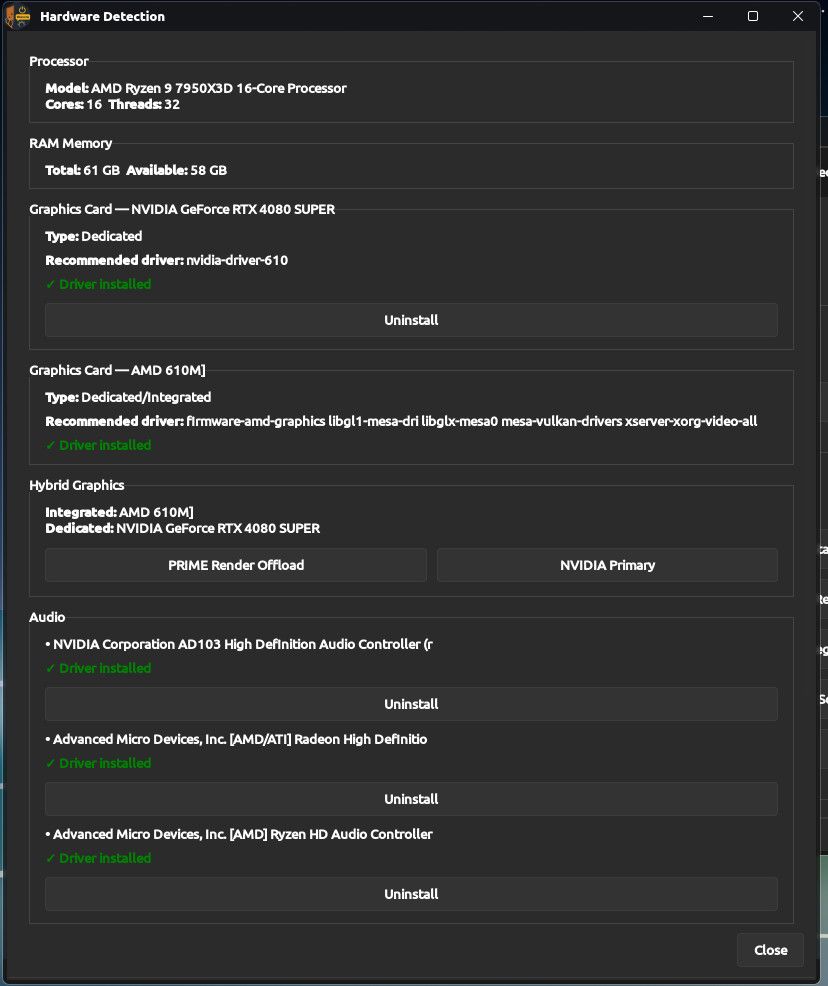
Will need to do this on all of my nvidia based laptops as well.
-
Hi masterpier,
We're really glad it worked! For your NVIDIA laptops, do the same: update the system, check that you have Welcome 2.1.4 or later, and reinstall the 7.3 kernel from the "Soplos Kernels" tab.
About removing the kernel from the main page without it being fully removed, thanks for pointing it out: we'll look into it.
Best regards

Hello! It looks like you're interested in this conversation, but you don't have an account yet.
Getting fed up of having to scroll through the same posts each visit? When you register for an account, you'll always come back to exactly where you were before, and choose to be notified of new replies (either via email, or push notification). You'll also be able to save bookmarks and upvote posts to show your appreciation to other community members.
With your input, this post could be even better 💗
Register Login