Skip to content

Tyson

14 Topics 94 Posts

Discussion about Soplos Tyson (Plasma Desktop)

  • Soplos (distrowatch) - spot #59 down from #98 and for the right reasons -

    2
    0 Votes
    2 Posts
    26 Views
    subdesS
    Hi, Thank you so much for your kind words and for spreading the word about Soplos! We're glad it has become your everyday system. Best regards
  • Join WiFi requires the password twice. Normal?

    5
    0 Votes
    5 Posts
    65 Views
    subdesS
    Hi Dingo, Thanks for the output and the screenshot. Your wallet exists, so the problem isn't that it's missing: the second window is launched by Plasma's network applet when it can't get the saved password. What @Simnandez suggests (thanks for the help) works as a solution: by choosing "Save password for all users", the password stops going through KWallet and is stored unencrypted in NetworkManager's configuration, in a file that only root can read. If that works for you, it's the quickest way to get rid of the prompt. If you'd rather understand the cause before changing it, paste the output of this with your network's name (no passwords): nmcli -f 802-11-wireless-security.psk-flags connection show "YOUR_NETWORK_NAME" And let us know whether you log in with a password or with automatic login. Best regards
  • NVidia Driver not installed???????????

    8
    1
    0 Votes
    8 Posts
    101 Views
    subdesS
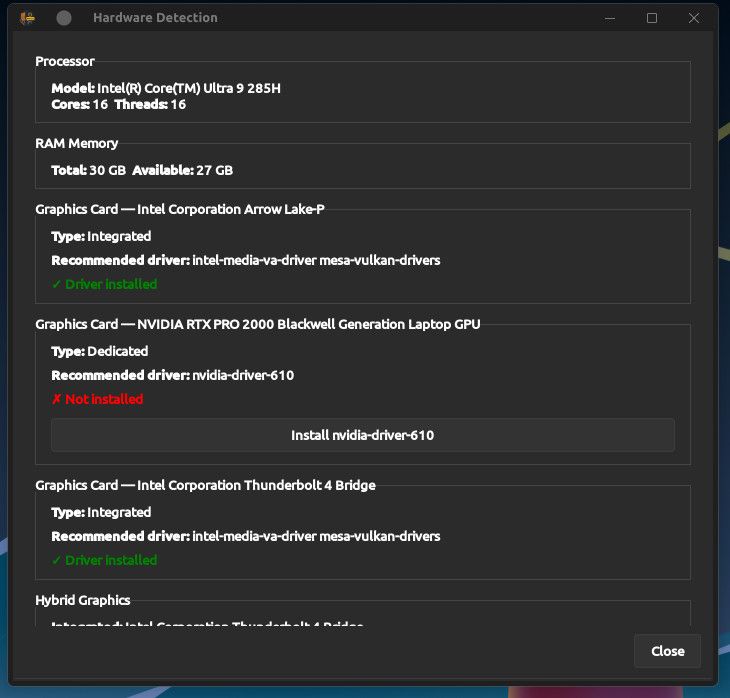
    Hi masterpier, We're really glad it worked! For your NVIDIA laptops, do the same: update the system, check that you have Welcome 2.1.4 or later, and reinstall the 7.3 kernel from the "Soplos Kernels" tab. About removing the kernel from the main page without it being fully removed, thanks for pointing it out: we'll look into it. Best regards
  • Issues with Ghostly on KDE

    4
    1
    0 Votes
    4 Posts
    58 Views
    subdesS
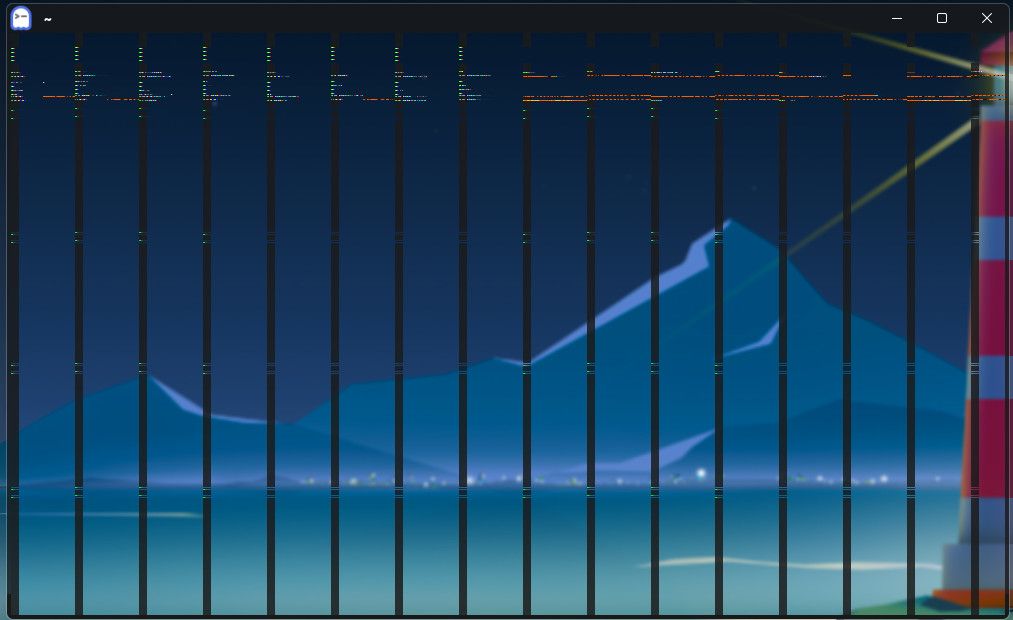
    Glad to hear that, masterpier! That makes perfect sense. Those visual artifacts (the vertical lines and broken text) are the classic symptom of a graphics driver not working properly or needing a reboot to apply the changes correctly. As soon as the system loads the NVIDIA driver as it should, hardware rendering goes back to normal. Thanks for coming back to confirm it's fixed. If it acts up again, we know where to look. Best regards!
  • Ghostty crashing

    9
    0 Votes
    9 Posts
    150 Views
    subdesS
    Hi dingo, no worries about the delay! Thanks for pasting the log, it was really helpful. We have a clear diagnosis now: the issue is your GPU (Intel HD Graphics 4000). As you can see at the end of your output, your system loads OpenGL 4.2, but Ghostty requires at least OpenGL 4.3. That's why the log shows failed to create EGL context and the window closes instantly. It's a hard hardware/driver limitation of that GPU, not something that can be fixed with updates or by tweaking Soplos' config. The simplest and most stable solution for your machine is to use Konsole (which is already installed and doesn't require that OpenGL version). I know it's not the same, but for this hardware it's the best option. Thanks for your patience and for the very detailed report!
  • Eye-candy 2026

    25
    0 Votes
    25 Posts
    936 Views
    subdesS
    You're absolutely right, dingo — it's not your OCD at all! ️‍️ I see the arrows and the misalignment on Battery, Kernel, and Desktop perfectly. The Fastfetch layout comes pre-configured and calibrated to the millimeter for Soplos' default font. If you've changed your terminal or KDE font to something else, the width of those specific icons changes and throws the column out of alignment. It looks flawless on my end because my config is completely stock. If you want to get that perfect alignment back, the easiest way is just to revert to the default font. Thanks for the sharp eye! [image: 1793057875790-12493435-eb60-4fd5-bb71-862528f6d4c5-image.jpeg]
  • KDE 6.8

    2
    0 Votes
    2 Posts
    43 Views
    subdesS
    Hi masterpier, Tyson currently ships Plasma 6.7.4. Plasma 6.8 came out a few days ago, but for Soplos it depends on when it reaches Debian Testing. The usual practice is to wait for the first bugfix releases (6.8.3, expected around mid-November) before uploading it to Sid, and then there's a testing period before it enters Testing. We can't give you an exact date, but it will most likely take a few weeks. Best regards
  • Sid in Repo

    4
    0 Votes
    4 Posts
    133 Views
    subdesS
    Hi Dingo, In Debian, "testing" is an alias that always points to the branch under development, while "forky" is the fixed name of the release that is currently in testing. When forky freezes and becomes stable, "testing" will start pointing to Duke, the next release. That's why our repo selector normally points to a mix of forky and testing, so that when forky freezes you keep receiving continuous updates. In the latest ISOs we've pointed only to forky until Duke enters testing, and at that point we'll point back to testing. Trixie is Debian's current stable release. If you installed with a recent ISO, you don't need to change anything. Best regards
  • Sd-Boot

    2
    0 Votes
    2 Posts
    90 Views
    subdesS
    Hi JoeDirt, You wouldn't break much. The only thing that stops working outright is grub-btrfs (Timeshift snapshots as boot entries — tied to GRUB by definition), and Soplos GRUB Editor, which obviously becomes pointless. Dracut isn't affected. It only generates the initramfs, independent of the bootloader — if anything the integration is more natural with systemd-boot via kernel-install. One thing worth knowing since you asked about every update: our soplos-release package (the version-identity package, updated frequently) runs update-grub in its postinst, guarded by command -v update-grub. If you fully purge the GRUB packages when switching, that check just fails cleanly and the step is skipped — no error, no broken update. If you instead keep the GRUB packages installed alongside systemd-boot, that hook will keep quietly running update-grub on every soplos-release update, rewriting a grub.cfg nothing reads — harmless, just wasted work. Also keep in mind our tools (Soplos Welcome, Kernel Installer) write kernel parameters to /etc/default/grub — e.g. nvidia-drm.modeset=1 when installing NVIDIA drivers. With systemd-boot that file goes unread, so you'd need to add those parameters manually to your boot entry. Other than that, updates won't give you trouble either way.
  • How to enlarge GRUB boot screen text

    9
    0 Votes
    9 Posts
    223 Views
    subdesS
    Great to hear it worked! Good catch on item_height too — makes sense, a bigger font needs more vertical room per menu entry, and that's exactly the kind of detail the Font Selector doesn't handle automatically yet. Thanks for sticking with it and reporting back what fixed it, that's useful for anyone else who runs into the same thing.
  • Tyson is replacing my current operating system!

    6
    0 Votes
    6 Posts
    256 Views
    subdesS
    Great to hear this, darknetmatrix! Two weeks of daily use with no issues, and the printer/scanner picked up right away — that's exactly the experience we're aiming for. Thanks for continuing to share your experience with Tyson, hope it lasts you for years to come!
  • Needed distro for new laptop - Soplos Tyson is it!

    7
    1 Votes
    7 Posts
    267 Views
    subdesS
    Thanks for the message, and for understanding these things take time! Really glad to hear that aside from the camera issue, the overall experience has been so good — fast, stable, and looking great on your XPS is exactly what we're aiming for. We'll keep you posted here once there's any news on the IPU7 front. Thanks for sticking with us!
  • Hello From Sweden

    9
    0 Votes
    9 Posts
    279 Views
    subdesS
    Hi again, Techy! Great to hear Soplos has become your definitive daily driver. And really interesting that Steam games are loading faster than on other distros — with your rig (Ryzen 7 9800 + RTX 5070 Ti) that's a real stress test, so that feedback carries a lot of weight. Thanks for continuing to share your experience in such detail, it's really appreciated. Enjoy the gaming!
  • Hi, All! Checking Out Soplos Tyson

    2
    0 Votes
    2 Posts
    153 Views
    subdesS
    Hi UncleSpellbinder, welcome and thanks for the kind words! Really glad the minimal approach is resonating with you — that's very intentional on our part. We'd rather ship a clean, focused app menu and let users add what they actually need, instead of dumping a pile of apps nobody asked for. Great to hear it's running well on the T14 Gen 1 too. Thanks for joining, and welcome aboard — looking forward to having you along for the ride!