Skip to content
  • Categories
  • Recent
  • Tags
  • Popular
  • Users
  • Groups
Collapse
Brand Logo

Soplos Linux

  1. Home
  2. English forums
  3. Tyson
  4. Join WiFi requires the password twice. Normal?

Join WiFi requires the password twice. Normal?

Scheduled Pinned Locked Moved Tyson
5 Posts 3 Posters 79 Views
  • Oldest to Newest
  • Newest to Oldest
  • Most Votes
Reply
  • Reply as topic
Log in to reply
This topic has been deleted. Only users with topic management privileges can see it.
  • dingoD Offline
    dingoD Offline
    dingo
    wrote on last edited by
    #1

    Hello Soploers!

    Coming from Fedora KDE I found this strange behaviour of the wifi menu.
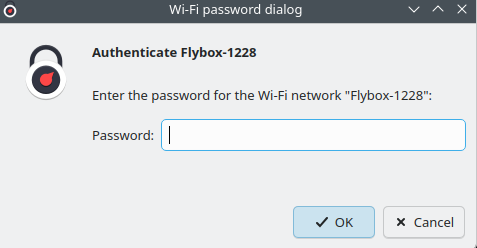
    When I select the network, I input the password directly on the menu (as it supposed to be) but then a plasma popup (similar to when the root pass is requested) appears to insert the wifi pass again. After that, I can finally connect.

    Is this normal with Debian testing?

    1 Reply Last reply
    0
    • subdesS Offline
      subdesS Offline
      subdes
      wrote last edited by
      #2

      Hi Dingo,

      Thanks for letting us know. What you describe happens in Plasma when the password can't be saved to the keyring (KWallet) and NetworkManager asks for it a second time, but we need to see what is going on on your machine. Could you tell us what the title of that second window says (or attach a screenshot), and whether you log in with a password or with automatic login? And paste the output of:

      kreadconfig6 --file kwalletrc --group Wallet --key Enabled
      ls ~/.local/share/kwalletd
      

      Best regards

      ๐Ÿง Sergi Perich โ€” Creator of Soplos Linux


      soplos.org ยท YouTube

      1 Reply Last reply
      0
      • dingoD Offline
        dingoD Offline
        dingo
        wrote last edited by
        #3

        the output is:
        dingo@macfart:~$ kreadconfig6 --file kwalletrc --group Wallet --key Enabled
        ls ~/.local/share/kwalletd

        kdewallet_attributes.json kdewallet.kwl kdewallet.salt

        I attached the dialog I see every time.dialog.png

        Thanks.

        1 Reply Last reply
        0
        • S Offline
          S Offline
          Simnandez
          wrote last edited by
          #4

          Could you try this?

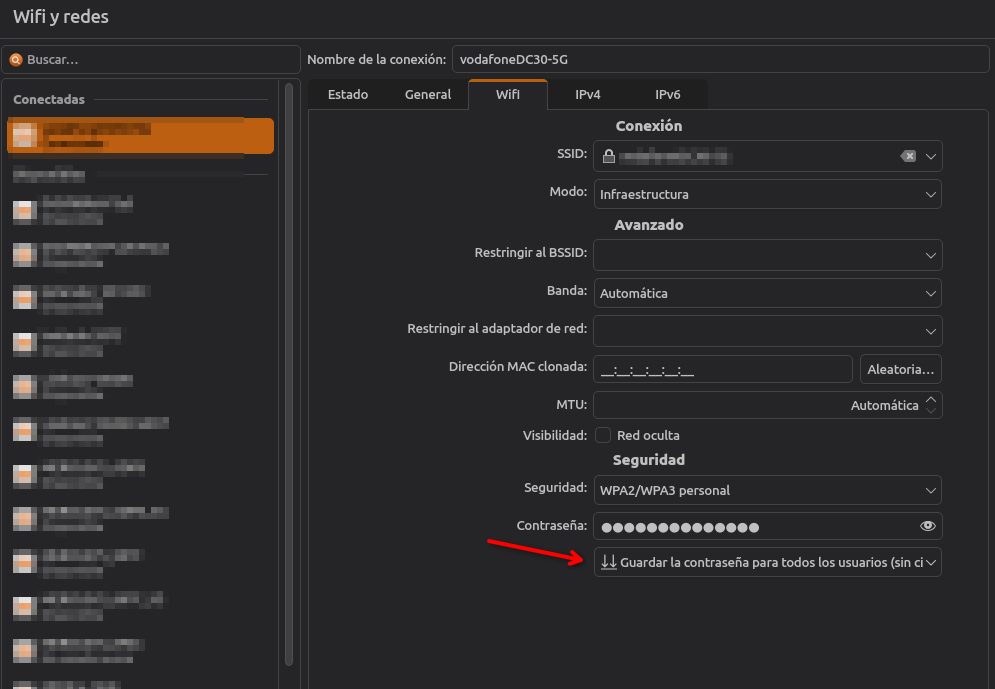
          In your Wi-Fi connection settings, under the "Wi-Fi" tab. you will see a drop-down menu just below the password field; select "Save password for all users."

          wifi_setup.png

          1 Reply Last reply
          0
          • subdesS Offline
            subdesS Offline
            subdes
            wrote last edited by
            #5

            Hi Dingo,

            Thanks for the output and the screenshot. Your wallet exists, so the problem isn't that it's missing: the second window is launched by Plasma's network applet when it can't get the saved password.

            What @Simnandez suggests (thanks for the help) works as a solution: by choosing "Save password for all users", the password stops going through KWallet and is stored unencrypted in NetworkManager's configuration, in a file that only root can read. If that works for you, it's the quickest way to get rid of the prompt.

            If you'd rather understand the cause before changing it, paste the output of this with your network's name (no passwords):

            nmcli -f 802-11-wireless-security.psk-flags connection show "YOUR_NETWORK_NAME"
            

            And let us know whether you log in with a password or with automatic login.

            Best regards

            ๐Ÿง Sergi Perich โ€” Creator of Soplos Linux


            soplos.org ยท YouTube

            1 Reply Last reply
            0

            Hello! It looks like you're interested in this conversation, but you don't have an account yet.

            Getting fed up of having to scroll through the same posts each visit? When you register for an account, you'll always come back to exactly where you were before, and choose to be notified of new replies (either via email, or push notification). You'll also be able to save bookmarks and upvote posts to show your appreciation to other community members.

            With your input, this post could be even better ๐Ÿ’—

            Register Login
            Reply
            • Reply as topic
            Log in to reply
            • Oldest to Newest
            • Newest to Oldest
            • Most Votes


            • Login

            • Don't have an account? Register

            • Login or register to search.
            • First post
              Last post
            0
            • Categories
            • Recent
            • Tags
            • Popular
            • Users
            • Groups