Skip to content
  • Categories
  • Recent
  • Tags
  • Popular
  • Users
  • Groups
Collapse
Brand Logo

Soplos Linux

  1. Home
  2. English forums
  3. Applications
  4. crash after update

crash after update

Scheduled Pinned Locked Moved Applications
13 Posts 3 Posters 179 Views
  • Oldest to Newest
  • Newest to Oldest
  • Most Votes
Reply
  • Reply as topic
Log in to reply
This topic has been deleted. Only users with topic management privileges can see it.
  • ? Offline
    ? Offline
    [[global:former-user]]
    wrote last edited by
    #1

    Hi again ๐Ÿ™‚ after todays update the vlc player and page manager crashes and i cant get them to work right. Any ideas what it could be ?

    1 Reply Last reply
    0
    • subdesS Offline
      subdesS Offline
      subdes
      wrote last edited by
      #2

      Hi again, Techy. We'll need a bit more info to help you out:

      1. Which app exactly do you mean by "page manager"? (Partition manager, something in KDE, another tool?)

      2. Install and run soplos-debug, then paste the "ANOMALIES FOUND" section:

        sudo apt install soplos-debug

      3. If you open VLC from a terminal (vlc), what error shows up right when it crashes?

      That'll help us see if this is coming from the update itself (a broken package/dependency) or something specific to your system.

      ๐Ÿง Sergi Perich โ€” Creator of Soplos Linux


      soplos.org ยท YouTube

      H 1 Reply Last reply
      0
      • subdesS subdes

        Hi again, Techy. We'll need a bit more info to help you out:

        1. Which app exactly do you mean by "page manager"? (Partition manager, something in KDE, another tool?)

        2. Install and run soplos-debug, then paste the "ANOMALIES FOUND" section:

          sudo apt install soplos-debug

        3. If you open VLC from a terminal (vlc), what error shows up right when it crashes?

        That'll help us see if this is coming from the update itself (a broken package/dependency) or something specific to your system.

        H Offline
        H Offline
        HappySoplosUser
        wrote last edited by
        #3

        @subdes said:

        sudo apt install soplos-debug

        you even have your own troubleshooting program?! Another awesome reason to choose Soplos!

        1 Reply Last reply
        0
        • subdesS Offline
          subdesS Offline
          subdes
          wrote last edited by
          #4

          That's right! soplos-debug generates a full system report (hardware, kernel, network, graphics, etc.) and automatically flags common anomalies, all locally without sending anything anywhere โ€” really handy for diagnosing issues quickly, both for you and for us. Glad you see it as another plus for Soplos, thanks for the comment!

          ๐Ÿง Sergi Perich โ€” Creator of Soplos Linux


          soplos.org ยท YouTube

          1 Reply Last reply
          0
          • ? Offline
            ? Offline
            [[global:former-user]]
            wrote last edited by
            #5

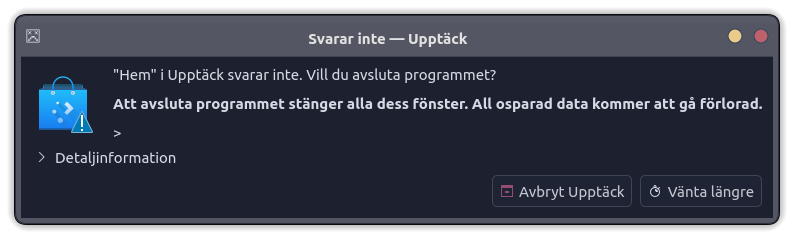
            Skรคrmbild_20260828_185518.png this application crashes from time to time and sorry for the late answer. I installed the Soplos debug how do i start it ? and vlc player is ok now .

            1 Reply Last reply
            0
            • subdesS Offline
              subdesS Offline
              subdes
              wrote last edited by
              #6

              Thanks for the screenshot, that clears it up! What's crashing is Discover (KDE's software manager), not a "page manager".

              To run soplos-debug, open it from the app menu (search for "Soplos Debug"), or from a terminal type:

              soplos-debug
              

              It'll generate a report at ~/soplos-debug.txt with an "ANOMALIES FOUND" section at the top โ€” paste that section here for us. And glad to hear VLC is working fine now.

              ๐Ÿง Sergi Perich โ€” Creator of Soplos Linux


              soplos.org ยท YouTube

              1 Reply Last reply
              0
              • ? Offline
                ? Offline
                [[global:former-user]]
                wrote last edited by
                #7

                ANOMALIES FOUND

                • PCI device with no driver: 00:00.2 IOMMU [0806]: Advanced Micro Devices, Inc. [AMD] Raphael/Grani
                • PCI device with no driver: 00:14.0 SMBus [0c05]: Advanced Micro Devices, Inc. [AMD] FCH SMBus Con
                • PCI device with no driver: 11:00.0 Non-Essential Instrumentation [1300]: Advanced Micro Devices,
                • 2 systemd service(s) failed

                ======================================================================

                1 Reply Last reply
                0
                • subdesS Offline
                  subdesS Offline
                  subdes
                  wrote last edited by
                  #8

                  Hi Techy,

                  The PCI devices with no driver (IOMMU, SMBus, AMD instrumentation) are normal, nothing to worry about there.

                  On the 2 failed systemd services: could you tell us which ones? You can check with:

                  systemctl --failed
                  

                  ๐Ÿง Sergi Perich โ€” Creator of Soplos Linux


                  soplos.org ยท YouTube

                  1 Reply Last reply
                  0
                  • ? Offline
                    ? Offline
                    [[global:former-user]]
                    wrote last edited by
                    #9

                    ok. echy@Cyber-Space:~$ systemctl --failed
                    UNIT LOAD ACTIVE SUB DESCRIPTION
                    โ— vboxadd-service.service loaded failed failed vboxadd-service.service
                    โ— vboxadd.service loaded failed failed vboxadd.service

                    Legend: LOAD โ†’ Reflects whether the unit definition was properly loaded.
                    ACTIVE โ†’ The high-level unit activation state, i.e. generalization of SUB.
                    SUB โ†’ The low-level unit activation state, values depend on unit type.

                    2 loaded units listed.
                    techy@Cyber-Space:~$

                    here you are hope it sqays you something i dont understand it ๐Ÿ™‚ and thank you for your help. and im realy pleased with Soplos Linux Tyson. i understand that Soplos is an Spanish word what is your intended meaning of the word or frase Im just curious.

                    1 Reply Last reply
                    0
                    • ? Offline
                      ? Offline
                      [[global:former-user]]
                      wrote last edited by
                      #10

                      And Kdes software manager Discover crashes all the time now i cant use it ๐Ÿ˜ž

                      1 Reply Last reply
                      0
                      • subdesS Offline
                        subdesS Offline
                        subdes
                        wrote last edited by subdes
                        #11

                        Hi Techy,

                        On the failed services: they're vboxadd-service.service and vboxadd.service, the VirtualBox Guest Additions services. The Soplos ISO ships with these preinstalled in case it's run inside a virtual machine โ€” but since your machine is real hardware, those services fail because they can't find the VirtualBox environment they expect. It's an expected mismatch, not an actual fault on your system.

                        You can uninstall them from Soplos Welcome: its hardware scanner detects exactly this case and recommends uninstalling them right from there, no commands needed.

                        On the meaning of "Soplos": good question! That's something I'm keeping to myself for now โ€” maybe I'll share it down the line.

                        And on Discover crashing: it's a known KDE/Debian bug (#1145932) we've been tracking โ€” it freezes when displaying PackageKit-backed apps, confirmed to happen every time since the plasma-discover update from Aug 27-28, and it's still not actually fixed upstream despite Debian marking it as resolved. As a workaround in the meantime, plasma-discover --mode Update does work (just for checking updates, not for installing new apps).

                        ๐Ÿง Sergi Perich โ€” Creator of Soplos Linux


                        soplos.org ยท YouTube

                        1 Reply Last reply
                        0
                        • ? Offline
                          ? Offline
                          [[global:former-user]]
                          wrote last edited by
                          #12

                          ok. Thanks for your help

                          1 Reply Last reply
                          0
                          • subdesS Offline
                            subdesS Offline
                            subdes
                            wrote last edited by
                            #13

                            ๐Ÿ˜‰

                            ๐Ÿง Sergi Perich โ€” Creator of Soplos Linux


                            soplos.org ยท YouTube

                            1 Reply Last reply
                            0

                            Hello! It looks like you're interested in this conversation, but you don't have an account yet.

                            Getting fed up of having to scroll through the same posts each visit? When you register for an account, you'll always come back to exactly where you were before, and choose to be notified of new replies (either via email, or push notification). You'll also be able to save bookmarks and upvote posts to show your appreciation to other community members.

                            With your input, this post could be even better ๐Ÿ’—

                            Register Login
                            Reply
                            • Reply as topic
                            Log in to reply
                            • Oldest to Newest
                            • Newest to Oldest
                            • Most Votes


                            • Login

                            • Don't have an account? Register

                            • Login or register to search.
                            • First post
                              Last post
                            0
                            • Categories
                            • Recent
                            • Tags
                            • Popular
                            • Users
                            • Groups